
Elegoo Jupiter 2 Review: A Brilliant Large Resin Printer Buried Under Too Many Bad Decisions
Last Updated on May 1, 2026 by FauxHammer

Let’s get one thing straight from the start: pointing out small annoyances on a machine like the Elegoo Jupiter 2 is not nitpicking for the sake of it. That is the review. Any half-decent resin printer can produce a model. That’s the baseline now. What matters is all the surrounding nonsense that either makes the journey smooth, or makes you want to launch the thing through a wall.
And that is exactly where the Elegoo Jupiter 2 gets itself into trouble.
Because in one very important way, this printer is excellent. In fact, when it comes to raw print output, it may well be one of the strongest large-format hobbyist resin printers in its class. But in almost every other area, it feels like a machine that spent over a year in development without anyone stopping to ask whether the user experience was actually any good.
That’s the frustration. This isn’t a bad printer in the sense that it can’t print. It absolutely can, and it does so very well. The problem is that the Elegoo Jupiter 2 is loaded with enough daft decisions, half-baked features, awkward ergonomics and clumsy software that a lot of people are going to bounce straight off it before they ever get to enjoy the part where it shines.
If you can work around all of that, you may end up loving it. If not, you’ll spend a lot of time asking why on earth nobody at Elegoo fixed the obvious stuff before release.
Table of Contents
- What the Elegoo Jupiter 2 is trying to be
- First impressions: big, heavy, modern-looking… and awkward
- External design quirks that should have been solved already
- The resin pump: included, intrusive, and badly implemented
- The user interface is still behind the rest of the market
- One thing they absolutely got right: the build plate
- The vat is where the positives dry up quickly
- Screen specs and maintainability
- The build height problem is ridiculous
- Camera and internal lighting: one of the smarter additions
- The slicer is still not where it needs to be
- Where the Elegoo Jupiter 2 finally redeems itself: print quality
- Do we even need this much sharpness?
- Pressure sensing sounds good, but didn’t work properly
- So where does that leave the Elegoo Jupiter 2?
- Who should actually buy the Elegoo Jupiter 2?
- Final verdict
- Elegoo Jupiter 2 FAQ
Please Note: This site uses affiliate links. Our Affiliate Partners are shown below
(Affiliate links will result in compensation to the site on qualifying purchases)
Click this link & buy your hobby stuff from Element Games for the UK & Europe to support FauxHammer.com – Use Code “FAUX2768” at the checkout for double reward points.




Our Affiliates / Hobby Stores
- UK: Element Games, The Outpost, Wayland Games, Mighty Lancer, Goblin Gaming, Forbidden Planet, Model Scenery Supplies, eBay, Amazon
- US/Canada: MTechCave, GameKastle, eBay (US), eBay (CA), Amazon
- Germany: Taschengelddieb
- Europe: eBay (DE), eBay (FR), eBay (ES), eBay (IT), Amazon
- Australia: eBay, Amazon
- Global: RedGrass Games, Warcolours
- 3D Printers: Phrozen 3D, Elegoo, Anycubic
FauxHammer – Latest Video on YouTube
What the Elegoo Jupiter 2 is trying to be
The Elegoo Jupiter 2 is a large-format resin printer aimed at people who want proper build volume without sacrificing fine detail. That means it is trying to cover both ends of the hobby spectrum:
high-detail miniatures,
bigger display pieces and statues,
and large batch printing when you want lots of parts at once.
On paper, that is a very compelling proposition. Big printers have often forced a compromise. You either got loads of space with less impressive pixel density, or incredible sharpness on smaller machines. The Elegoo Jupiter 2 is clearly trying to offer both.
And to be fair, in pure output terms, it mostly delivers on that promise.
But before we get to the good bit, we have to talk about the machine itself, because this is where the grumbling starts almost immediately.
The Best 3D Printers for Miniatures
This article is part of our Best 3D Printers for Miniatures Article.
To see the full list of 3D printers check out that article.
First impressions: big, heavy, modern-looking… and awkward
Unboxing the Elegoo Jupiter 2 is at least fairly straightforward. Tip the box sideways, slide the machine out, strip away the foam, and there it is: a very large, very heavy printer in what has become the modern Elegoo design language.
You’ve got metal panels around the base and rear, plastic doors at the front, and a big dark viewing window.
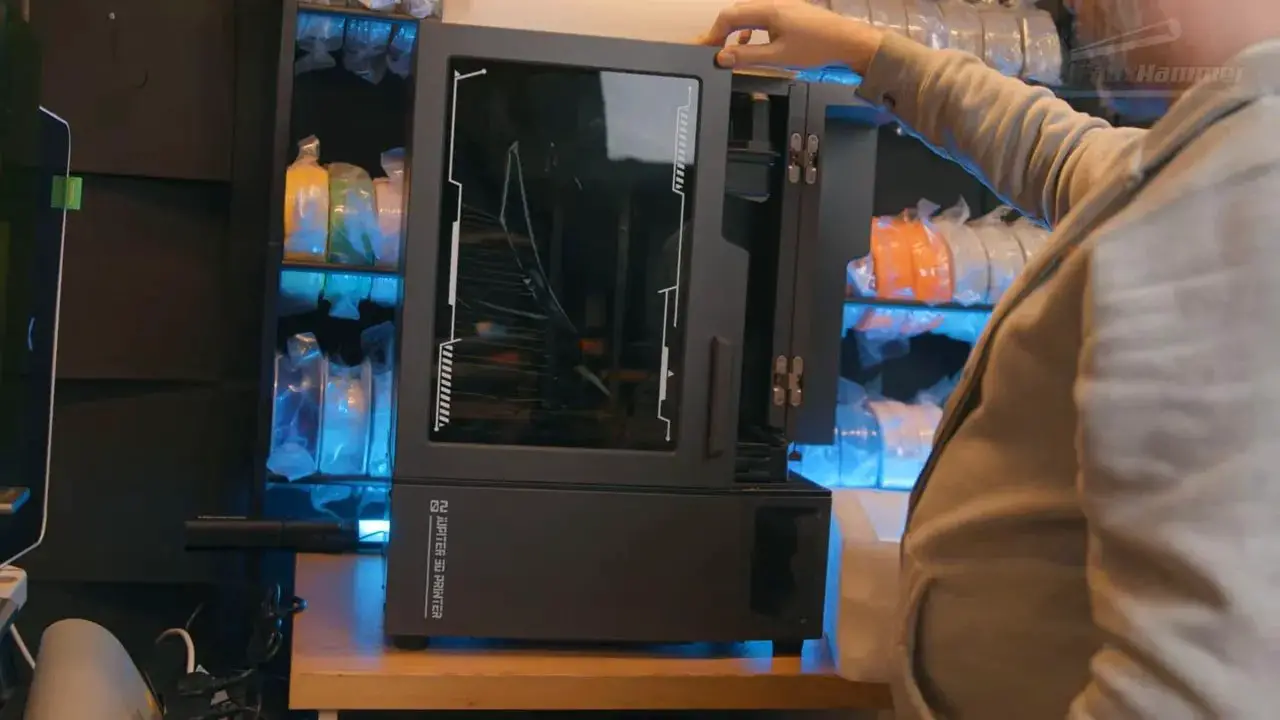
The issue is that this dark viewing window is not especially pleasant to look through. Visibility of the print area is worse than on a lot of current machines, and the heavy tint doesn’t help. There’s also a broader point here that’s easy to miss until you think about it: there’s a reason so many UV devices use orange covers. Orange acrylic is far better at blocking the relevant wavelength of light. Here, the dark cover may look sleek, but it isn’t exactly inspiring confidence.
Then we get to the doors, and this is one of those things that sounds minor until you actually place the printer on a desk.
The Elegoo Jupiter 2 uses two side-opening front doors that swing wide in both directions. Fully open, they take up roughly 93 to 94cm across your workspace. Worse still, during the arc of opening, the outer corners need something closer to 111cm of clearance.
That is absurd on a printer that is only around 46.5cm wide.
If your printing area is tight, and for plenty of people it is, that matters. Desk space is not infinite. Having a machine effectively demand over a metre of operating clearance just so you can access the vat and plate is a pain. Yes, you can remove the doors by unscrewing hinges, but that is not the same as having a sensible single-lid design in the first place.
It is a perfect example of the sort of issue that doesn’t show up on a spec sheet but absolutely affects real ownership.
External design quirks that should have been solved already
The rear of the Elegoo Jupiter 2 keeps the irritation going.
You’ve got:
the power socket on the back,
the rocker switch on the back,
an extraction plate on the back,
and the resin pump bottle setup on the back.
So if you want to power it on, you’re reaching around the rear of a large, heavy printer. If you want to access the refill setup, you’re reaching around the rear of a large, heavy printer. If the machine crashes and needs power-cycling, same story.
It’s not clever placement. It’s just inconvenient.
There are also openings in the rear chassis where vapours can escape, which undermines any benefit gained from the machine feeling slightly more sealed at the front. So even where the printer appears to be moving toward a better enclosed design, that advantage is partly undercut elsewhere.
There is a side-mounted USB port too, but at least the Elegoo Jupiter 2 includes Wi-Fi, so in practice many people will just send files remotely and ignore the port altogether.
The resin pump: included, intrusive, and badly implemented
This is where things begin to get properly silly.
The Elegoo Jupiter 2 includes a resin pump system. In theory, this is there to keep the vat topped up. In practice, it is a custom bottle and caddy arrangement mounted at the rear of the printer, connected through a six-pin outlet.
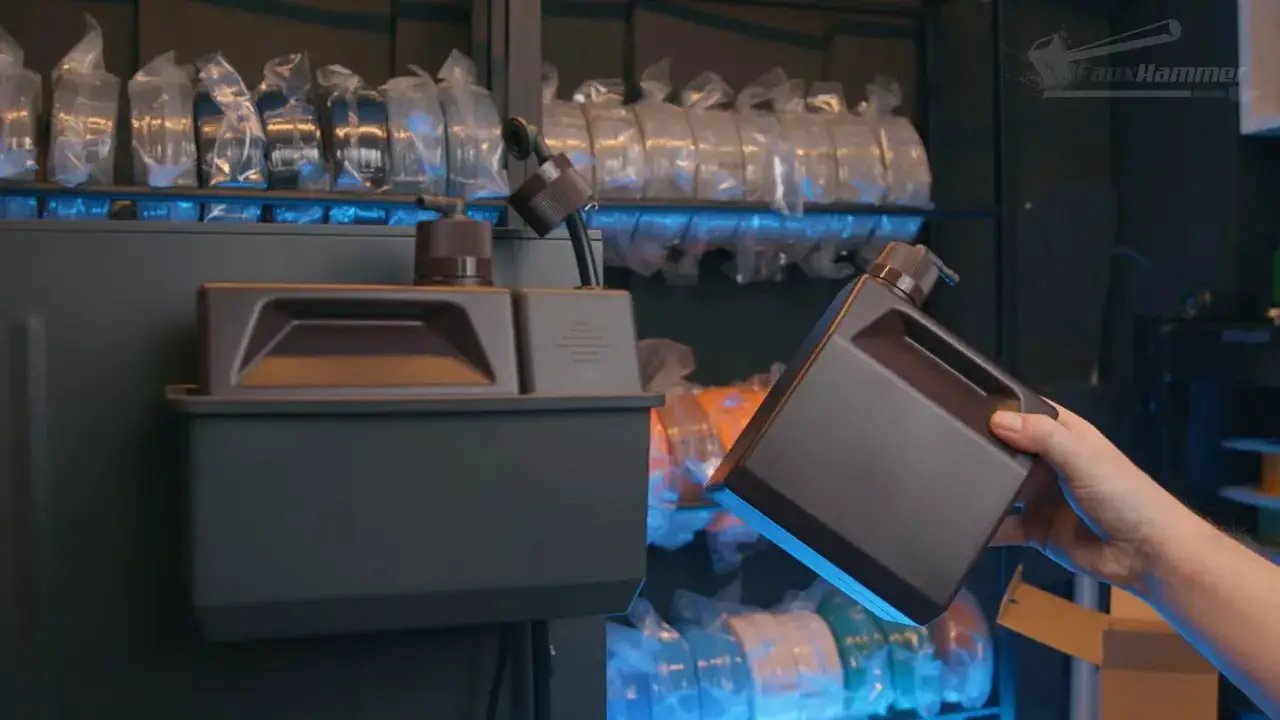
Now, there are already plenty of people who don’t really want resin pumps on hobby printers. They add mess. They add tubing. They complicate material changes. They make cleaning more annoying. For a lot of users, pouring resin in by hand and using a syringe to remove it later is simply easier and cleaner.
So the first problem is philosophical: this should really have been an optional accessory, not a feature baked into the machine’s workflow.
The second problem is practical: on this unit, the hose reportedly detached from inside the pump during nothing more dramatic than changing the bottle lid. That required disassembly just to put the tube back where it belonged.
That is not confidence-inspiring.
After that, disabling the feature would seem the obvious fix. But no. The Elegoo Jupiter 2 then throws up a warning at the start of every print saying the pump is disabled, and insists on manual confirmation via the touchscreen before it will proceed. So even if you don’t want to use the pump, the printer still makes you interact with it.
Worse, if the unused nozzle isn’t positioned correctly, the printer may refuse to start at all.
That is exactly the sort of design decision that makes people lose patience. A feature you don’t want, don’t trust, and have turned off should not still be getting in the way of the basic task of starting a print.
Elegoo apparently said the final version would be more robust, which is nice in theory, but this machine was revealed a long time before release. At some point, “it’ll be fixed in the final version” stops sounding reassuring and starts sounding like evidence of poor development.
The user interface is still behind the rest of the market
The touchscreen on the Elegoo Jupiter 2 is an improvement over older Elegoo machines, but that is faint praise. Compared with better modern interfaces, this still feels clumsy.
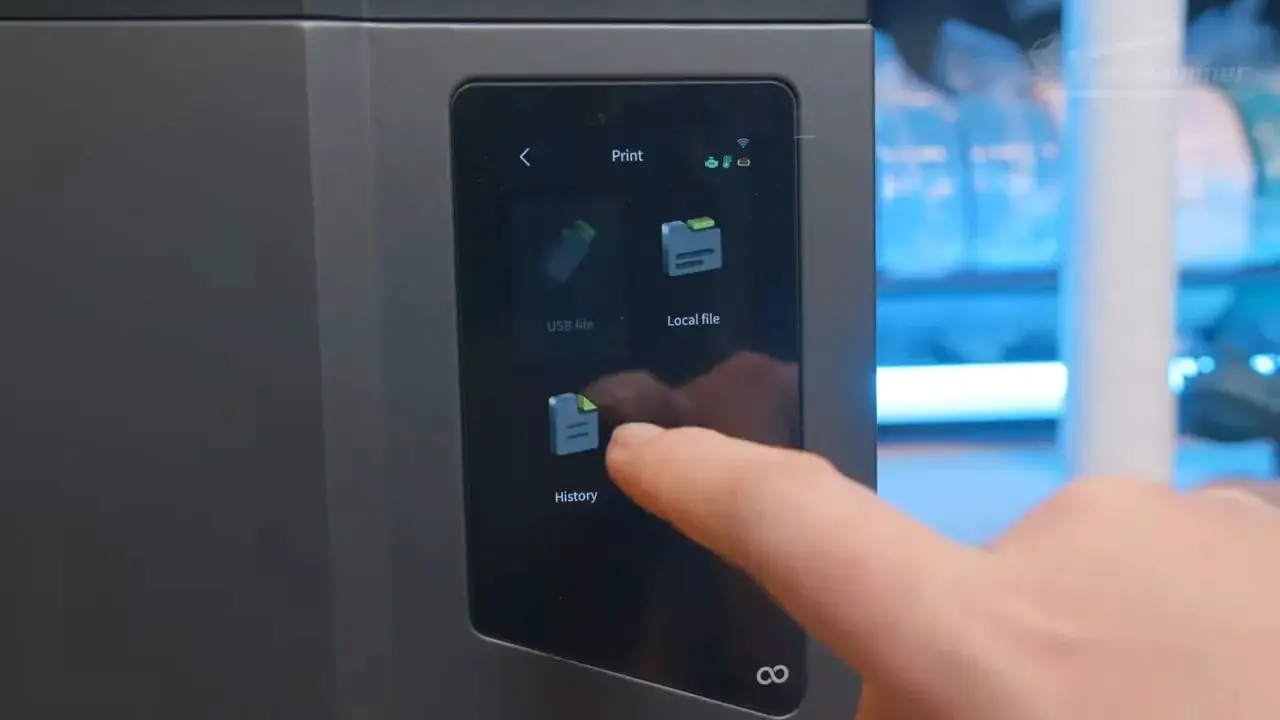
It uses a portrait-oriented display, which is already a bit awkward. That narrow layout then limits things like the on-screen keyboard during setup. More importantly, the overall menu structure is not especially intuitive, and some useful functions seen on other recent Elegoo models are missing here.
For example, the multi-exposure test function found on machines like the Mars 5 and Saturn 4 Ultra is absent. The plan, apparently, is for something similar to come via the slicer later.
Again: later.
During printing, the screen also times out to a pulsing progress display that prioritises percentage complete. Fine, but percentage complete is not usually the bit of information you actually care about mid-print. Time remaining is the useful one, and here it ends up tiny, greyed out, and harder to read on a dimmed screen. Tap the display to brighten it and the UI shifts around, moving the information elsewhere.
None of this makes the printer unusable. That’s the important distinction. The Elegoo Jupiter 2 can still be operated perfectly well. But so many elements feel like they exist because that’s just what Elegoo did before, not because anyone asked what would actually work best now.
One thing they absolutely got right: the build plate
It’s not all moaning. In fact, one part of the Elegoo Jupiter 2 is genuinely excellent: the build plate.
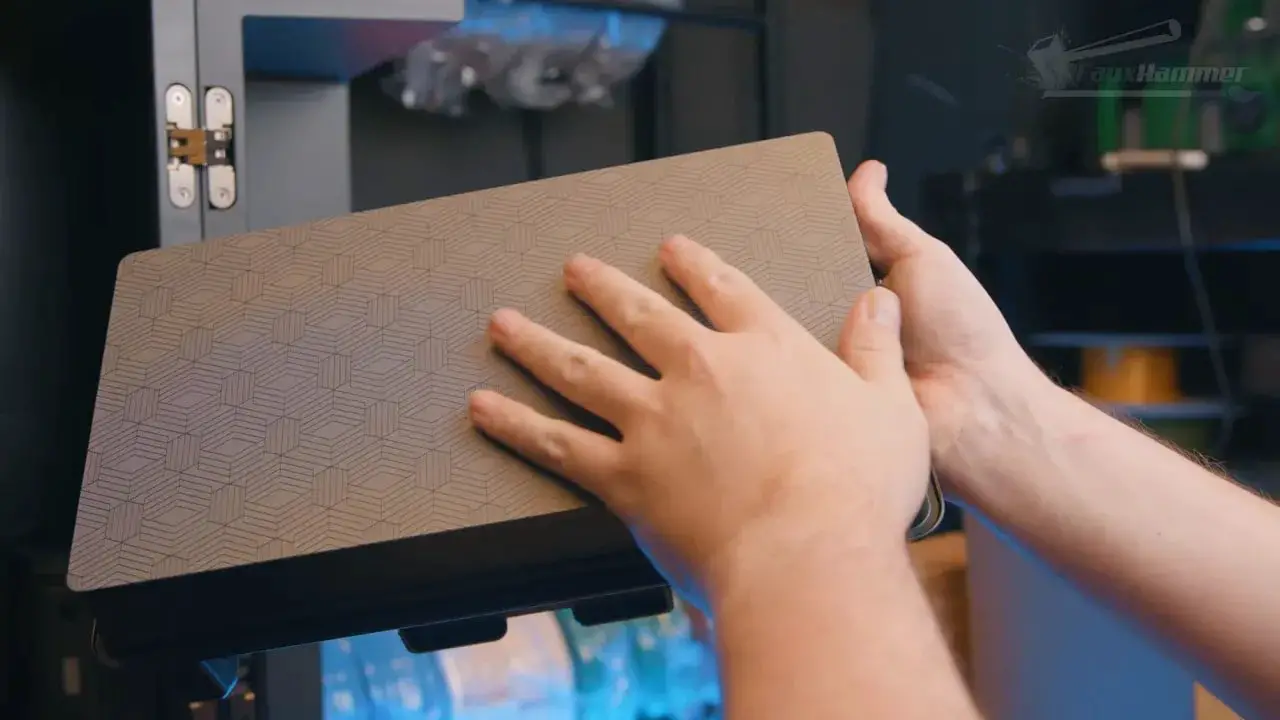
It is large and heavy, naturally, but it has proper carry handles and a grippy laser-etched surface. More importantly, the shape is smart. Rather than a flat slab that happily lets resin collect on top and drip from every edge, this one uses a more considered form with a lip around the edge that helps prevent drips when the plate is inverted.
It looks very much inspired by the style used by brands like Uniformation, and ultimately by Formlabs before that. And honestly, good. That’s a design worth borrowing.
The Elegoo Jupiter 2 also ditches the odd two-tier build plate arrangement seen on some other recent Elegoo machines, which is definitely for the best.
The only real complaint here is material choice. It is still aluminium, not stainless steel. Stainless would wear better and resist scratches more effectively. But even so, this is probably the strongest physical component on the whole machine.
The printer should arrive pre-levelled, and there are sensors in the plate itself to assist with levelling if needed. The plate locks into the arm using a large lever, and by all accounts it feels satisfyingly solid.
Credit where it’s due: this part is good.
The vat is where the positives dry up quickly
The vat on the Elegoo Jupiter 2 starts promisingly enough with clear PFA release film, but after that the problems stack up.
Yes, there is a pour spout. No, it doesn’t project far enough to stop resin dribbling down the outside and underneath the vat. Tilt the vat one way and it runs down the side. Tilt it too far the other and resin can flow over the edge.
So emptying the vat becomes an annoying balancing act instead of a straightforward job.
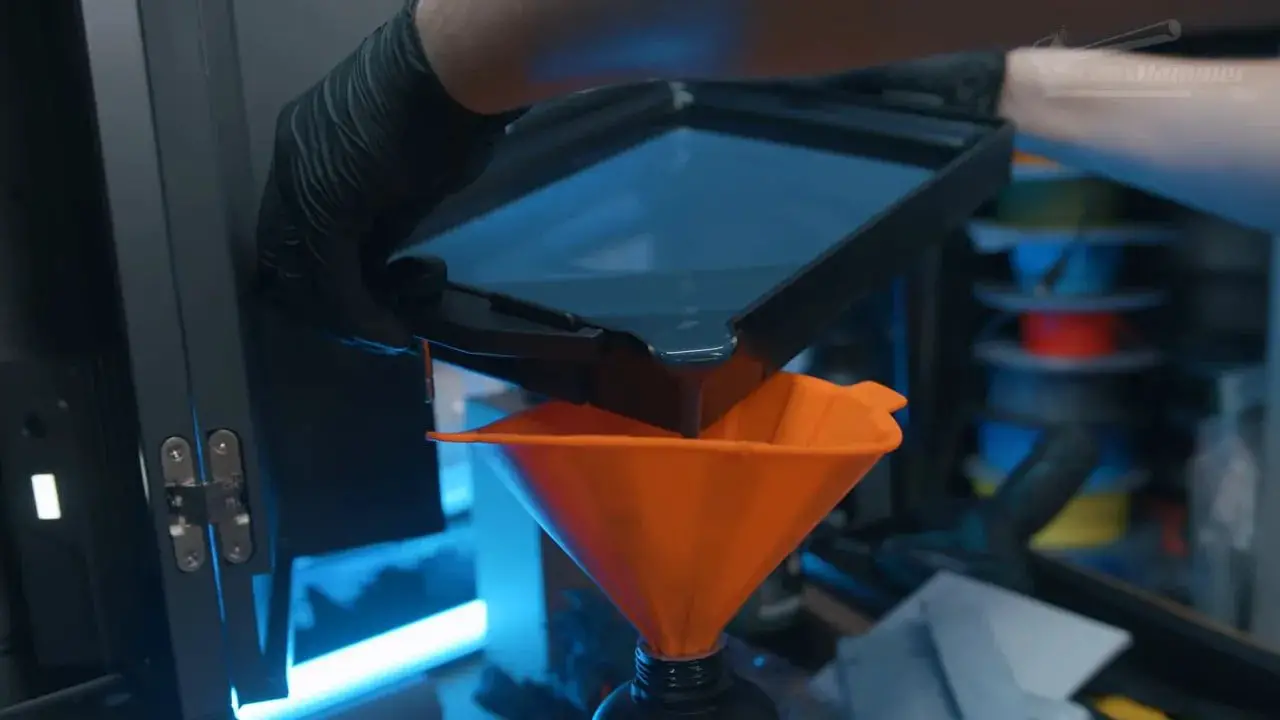
The vat is also relatively shallow for a machine of this size. You get roughly one bottle of resin in before hitting the max line. That is limiting on a large-format printer, and it clearly ties back into Elegoo expecting users to rely on the pump to top things up. If you don’t want to use the pump, that’s not ideal.
Mounting is handled with bolts rather than tool-free clamps. Again, not the end of the world, but also not where the market is now. A lot of these frustrations would be easier to shrug off if the machine were old or cheap or clearly entry-level. The Elegoo Jupiter 2 is none of those things.
There is an integrated heater, which is welcome, but it is locked to a fixed 25°C. For many hobby resins, that is perfectly fine and probably ideal for typical users. But the inability to set a different temperature is limiting if you work with engineering materials or just want more control.
And then there’s the release film system. The latch design around the vat initially suggests a more elegant “hoop” style system for changing films. Sadly, that hope is only half true. The latches clamp the frame to the vat, but replacing the film itself still means undoing all the screws in the frame manually.
Pre-framed replacements are apparently planned, and yes, many people will gladly pay for convenience. But it still feels like another case where the concept almost reaches modern standards and then stops halfway.
Screen specs and maintainability
At the heart of the Elegoo Jupiter 2 is a large 16K mono LCD. The screen resolution is 15,120 by 6,230 pixels over a printable area of 302 by 162mm, which works out to roughly a 13.5-inch panel.
That gives rectangular pixels measuring about 20 microns on the X axis and 26 microns on the Y.
Those numbers matter if you are chasing maximum sharpness, and for a large-format printer they are impressive. This is the same big 16K class of screen other brands have used, and it absolutely gives the machine the potential for serious detail.
The nice bit here is serviceability. Elegoo has finally made screen replacement much more straightforward. Remove the tape, remove the screws, disconnect the ribbon cable, and you are there. That is a meaningful improvement and exactly the sort of thing manufacturers should be doing.
The build height problem is ridiculous
Now for one of the strangest design issues on the entire Elegoo Jupiter 2.
The advertised build height is 300mm. Lovely. Except there is a catch: if you actually print something that tall, removing the build plate can become a problem because the printer does not give enough extra upward travel to clear the vat properly.
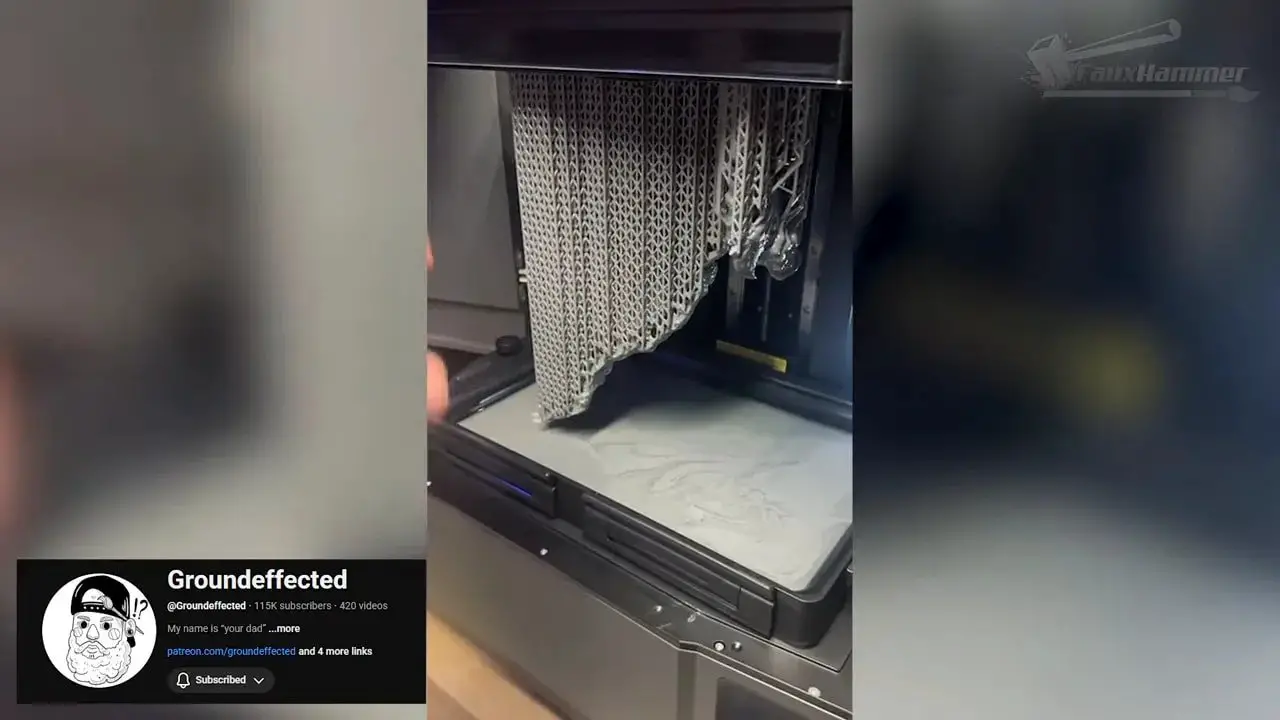
In other words, the machine can technically print to full height, but real-world removal of those max-height prints may be a nightmare.
That’s not a fussy edge case. That’s a design flaw in the basic physical envelope of the printer.
One suggested workaround was to have two people: one holding the vat while the other removes the plate. Which is funny, but not in a good way. If your workaround for normal use of a desktop hobby printer is “find another person”, something has gone badly wrong.
Another suggestion was simply not to print to full height.
Right. In that case, don’t advertise 300mm. Limit it in software to the height that can actually be used sensibly, somewhere around the 265mm to 278mm region, and state that honestly. Or better yet, design the machine with enough spare Z travel to clear the vat edge properly, which is what you would expect.
It’s such an obvious oversight that it almost feels surreal.
Camera and internal lighting: one of the smarter additions
Not every new feature is a mess. The built-in camera and internal light on the Elegoo Jupiter 2 are actually quite sensible.
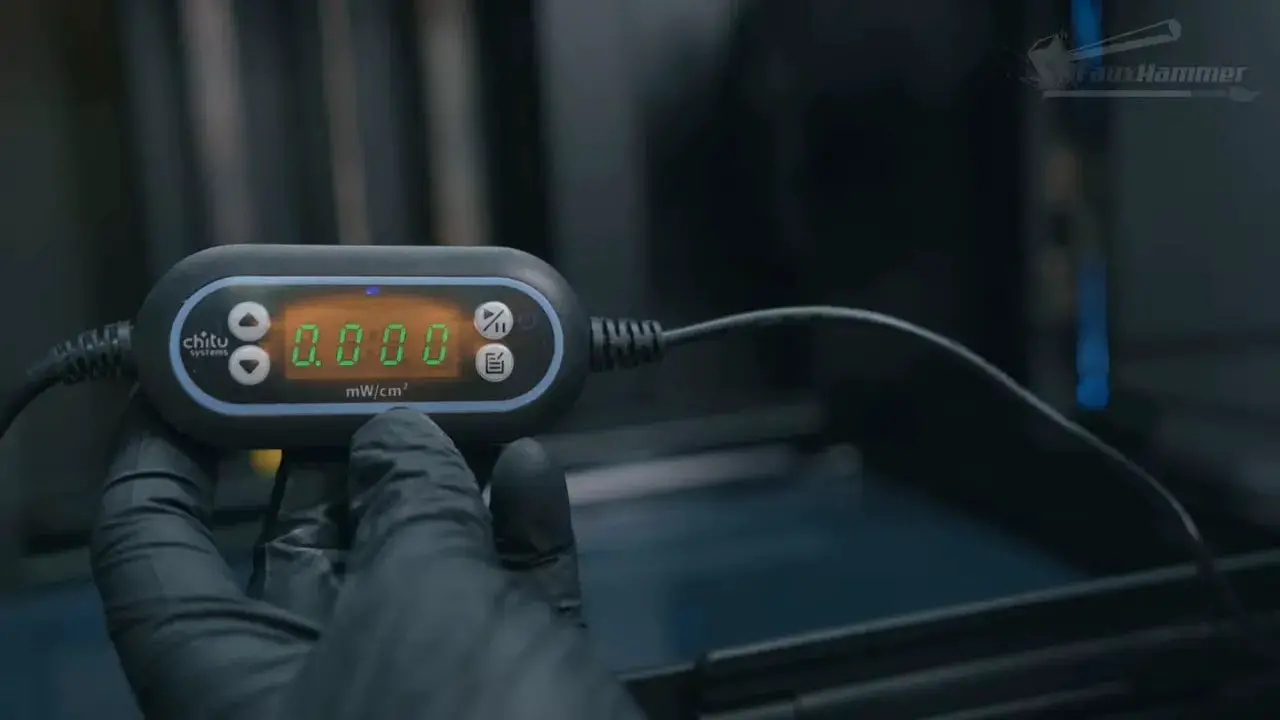
The internal light is white rather than UV-emitting, and testing with a UV meter reportedly confirmed it does not cure resin in the vat. That is good, because a permanently active internal light would be a terrifying idea if it leaked UV.
The camera is intended for remote monitoring through Elegoo’s Matrix app. At the time of testing, that live monitoring side was not fully ready to show, but the machine could produce time-lapse recordings and allow those to be retrieved remotely, which is still handy.
The catch, unfortunately, is quality. The captured video may be 1280×720 on paper, but if the bitrate is poor, the result still looks rough. So it’s useful as a utility feature more than a polished one.
That more or less sums up the machine, really: good idea, patchy execution.
The slicer is still not where it needs to be
At the time of testing, Elegoo SatelLite was the only compatible slicer for the Elegoo Jupiter 2. It is heavily based on VoxelDance Tango, which had already built up a fairly poor reputation with plenty of users.
The biggest immediate annoyance is basic model movement. Instead of simply selecting and dragging objects around in a clean, obvious way, the software initially appears to force you through a more cumbersome move tool workflow. There is a less painful method hidden in there, where dragging from the central blue square keeps Z locked, but the fact that you have to discover that by trial and error says quite a lot.
Auto-layout also lacks a useful option to arrange parts without rotating them, which is especially irritating if you are doing test prints and need to preserve orientation.
Beyond that, there are crashes, visual bugs, clumsy resin management menus, and odd interface choices that make the software feel unfinished. Not unusable. Just janky.
That matters because a printer experience is never only the hardware. If your slicer is flaky, your workflow is flaky.
Where the Elegoo Jupiter 2 finally redeems itself: print quality
Here’s the thing. After all of that moaning, all of those maddening choices, all of the “why is it like this?” moments, the Elegoo Jupiter 2 finally gets to the part that matters most.
And it prints brilliantly.
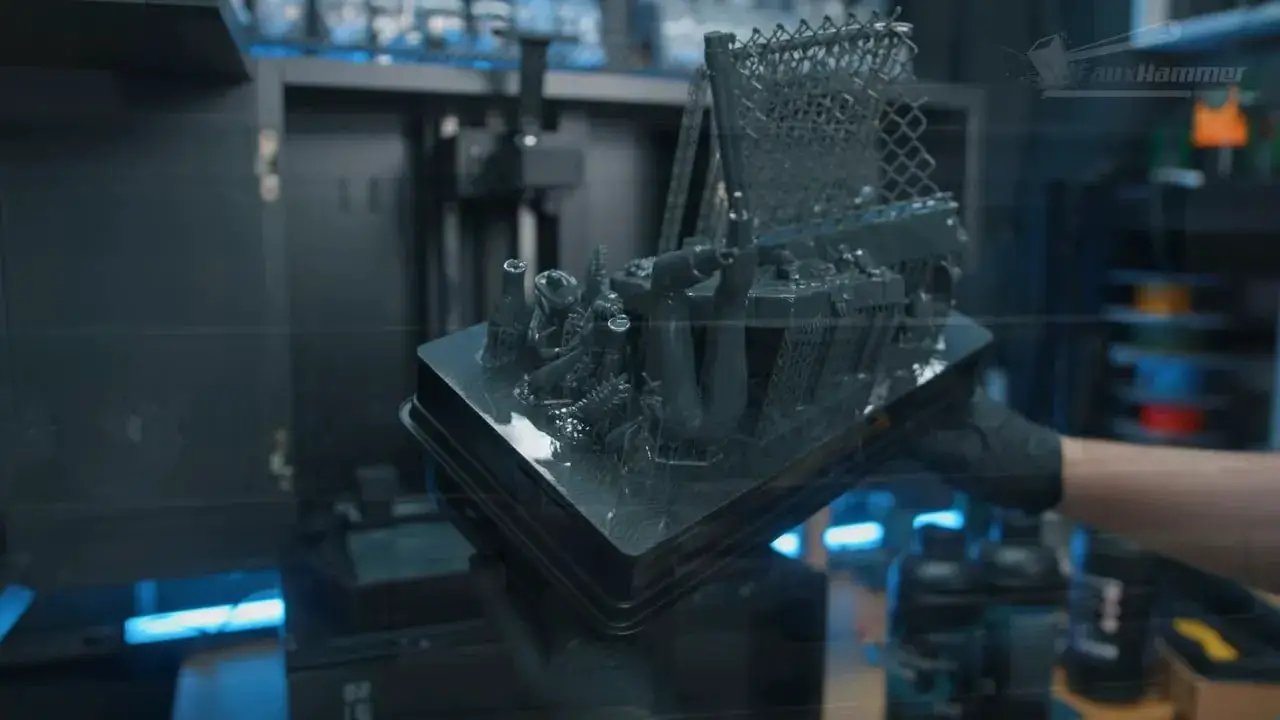
There’s no spring-loaded build plate nonsense here. No springy screen. No tilting vat mechanism. No odd release gimmicks trying to be too clever. Just a flat plate pressing onto a flat, fixed screen, curing layers in a conventional, stable way.
That simplicity pays off.
Using quality-focused settings rather than chasing speed, the machine reportedly produced some of the sharpest XY exposure test results seen on a printer of this size. Not just sharp in a superficial sense, either. Rafts came out the correct thickness rather than over-bloated. Calibration tests looked solid. Anti-aliasing behaved as expected and softened voxel lines effectively.
That is the real strength of the Elegoo Jupiter 2: it gets the fundamentals of layer formation right.
Miniatures printed with and without anti-aliasing showed excellent detail. Larger pieces, including multiple statue-sized models, also came out cleanly with no layer shifts, tears or print failures during testing.
That consistency matters more than flashy feature lists. When this machine is simply allowed to behave like a traditional flatbed resin printer, it does very well indeed.
Do we even need this much sharpness?
There is also a bigger point worth making here, because 16K has become one of those specs people latch onto as if it tells the whole story.
Yes, the Elegoo Jupiter 2 is very sharp. Yes, that matters. But once you get into pixel sizes in the mid-20 micron range, and the rest of the machine isn’t doing anything stupid with overpowered lighting or bad mechanics, you are already in the territory of “good enough for nearly everything”.
That doesn’t make a sharper screen pointless. It just means sharpness should be part of the value conversation, not the only conversation.
If anti-aliasing can already soften visible pixel structure to the point where differences become subtle, then the question is not simply “is this sharper?” but “what trade-offs am I making to get that sharpness?”
With the Elegoo Jupiter 2, those trade-offs are significant.
Pressure sensing sounds good, but didn’t work properly
Another feature that looked promising on paper was pressure sensing. In the slicer, there are options for static mode and dynamic modes such as high speed or smooth, which should adjust lift and retract behaviour based on sensed forces during printing.
In practice, dynamic modes reportedly caused the printer to crash at the start of prints, requiring a full power cycle to recover.
And because the power switch is inconveniently placed round the back, even that recovery process is more annoying than it needs to be.
Static mode worked. Dynamic mode did not. So for now, this is another feature filed under “nice idea, not ready”.
So where does that leave the Elegoo Jupiter 2?
This is the awkward bit, because the Elegoo Jupiter 2 is not remotely a write-off.
If your question is simply, “Can it print extremely detailed models at large format?” then yes, absolutely. In that sense, it may be one of the strongest machines currently available in its size bracket. It handles miniatures beautifully. It handles big models beautifully. It does the actual printing part with a level of simplicity and reliability that some more gimmick-heavy machines have managed to trip over.
But if your question is, “Is this a polished, well-considered, modern product?” then no, not really.
Too many things about the Elegoo Jupiter 2 feel outdated, unfinished, or just plain daft:
the over-wide doors,
the rear-mounted controls and refill access,
the intrusive pump behaviour,
the clumsy UI,
the mediocre vat design,
the fixed-only heater,
the half-finished film replacement approach,
the awkward full-height clearance issue,
the unstable advanced pressure-sensing modes,
and slicer software that still needs a fair bit more time in the oven.
That would be easier to forgive if this machine had launched much earlier. Had the Elegoo Jupiter 2 appeared closer to when it was first shown, some of these compromises might have felt more acceptable. But the market has moved on. Competing brands have improved usability, smarter feature integration and more polished ecosystems.
So this printer lands in a weird place: exceptional in the one area that matters most, but frustrating in far too many of the surrounding ones.
Who should actually buy the Elegoo Jupiter 2?
I think the answer is fairly specific.
The Elegoo Jupiter 2 makes sense forElegoo Jupiter 2 Review: A Brilliant Large Resin Printer Buried Under Too Many Bad Decisions someone who:
cares deeply about print quality on a large machine,
wants to print both miniatures and larger models without sacrificing detail,
doesn’t mind a more old-school resin printing workflow,
is willing to work around software and hardware annoyances,
and values a flat, stable, non-gimmicky print mechanism over flashy automation.
It probably makes less sense if you want a smooth, refined, convenience-first experience. If your patience for bad UX is low, the Elegoo Jupiter 2 will test you.
This is not the machine for someone who wants to be coddled by elegant automation. It is the machine for someone willing to put up with nonsense in exchange for excellent output.
Final verdict
The strangest thing about the Elegoo Jupiter 2 is that it proves a manufacturer can still build a technically impressive resin printer while simultaneously making you question dozens of decisions around it.
When it prints, it’s superb. Seriously superb. Sharp, consistent, reliable output on a large-format machine is not nothing, and that alone will make this printer very tempting to the right buyer.
But all the surrounding experience feels like it belongs to a less mature market than the one we’re in now. Too many features seem unfinished. Too many ergonomic choices are awkward. Too many small frustrations were apparently allowed through development unchecked.
So no, this isn’t a disaster. It is not a machine to avoid at all costs. But it is absolutely a machine that should have been better than this, especially after such a long wait.
If you want the highest-detail large-format resin printing and you’re happy to put up with a pile of compromises, the Elegoo Jupiter 2 has a strong case. If you want a printer that feels modern in every area, not just on the spec sheet and in the final print, then this one is much harder to recommend without a long asterisk attached.
Please Note: This site uses affiliate links. Our Affiliate Partners are shown below
(Affiliate links will result in compensation to the site on qualifying purchases)
Click this link & buy your hobby stuff from Element Games for the UK & Europe to support FauxHammer.com – Use Code “FAUX2768” at the checkout for double reward points.
Our Affiliates / Hobby Stores
- UK: Element Games, The Outpost, Wayland Games, Mighty Lancer, Goblin Gaming, Forbidden Planet, Model Scenery Supplies, eBay, Amazon
- US/Canada: MTechCave, GameKastle, eBay (US), eBay (CA), Amazon
- Germany: Taschengelddieb
- Europe: eBay (DE), eBay (FR), eBay (ES), eBay (IT), Amazon
- Australia: eBay, Amazon
- Global: RedGrass Games, Warcolours
- 3D Printers: Phrozen 3D, Elegoo, Anycubic
FauxHammer – Latest Video on YouTube
Elegoo Jupiter 2 FAQ
Is the Elegoo Jupiter 2 a bad printer?
No. The core printing performance of the Elegoo Jupiter 2 is very good. The frustration comes from usability issues, awkward design choices and unfinished-feeling features around that excellent print engine.
How good is the print quality on the Elegoo Jupiter 2?
Print quality is the machine’s strongest point. The Elegoo Jupiter 2 produces very sharp results for a printer of this size, with strong consistency across both miniatures and larger models when using quality-focused settings.
Does the Elegoo Jupiter 2 support large prints properly?
It supports large prints in terms of build area and detail, but there is a serious caveat with maximum build height. Prints at the advertised top end of the Z range may be awkward or impractical to remove because the plate does not appear to have enough extra travel to clear the vat properly.
Is the resin pump on the Elegoo Jupiter 2 worth using?
That will depend on personal preference, but the implementation here raises concerns. The pump system is intrusive even when disabled, and there were reliability concerns with the tubing during setup. Many users may prefer to ignore it entirely and fill the vat manually.
Does the Elegoo Jupiter 2 have a heater?
Yes, the Elegoo Jupiter 2 includes an integrated heater, but it is fixed to 25°C in software. That is fine for many common hobby resins, but it does not offer the flexibility some advanced users may want.
Is the slicer for the Elegoo Jupiter 2 any good?
At the time of testing, the slicer was functional but rough. It had crashes, visual bugs and some unintuitive workflow choices. It worked, but it did not feel as polished as the better slicers in the resin printing space.
Who is the Elegoo Jupiter 2 best suited for?
The Elegoo Jupiter 2 is best suited for users who care most about large-format print quality and are willing to tolerate a more awkward overall experience to get it. If convenience and polish matter more to you, this may not be the best fit.
If nothing else, the Elegoo Jupiter 2 is proof that nobody seems capable of making the perfect resin printer. There is always some baffling compromise hiding in there somewhere. This machine just has more of them than it should.
This article was created from the video THIS TOOK A YEAR!?!?! – Elegoo Jupiter 2 Review with the help of VideoToBlog.






 English (UK)
  Deutsch
  Français
  Italiano
  Español