
xTool F2 Ultra UV Review – The Truth About This Laser
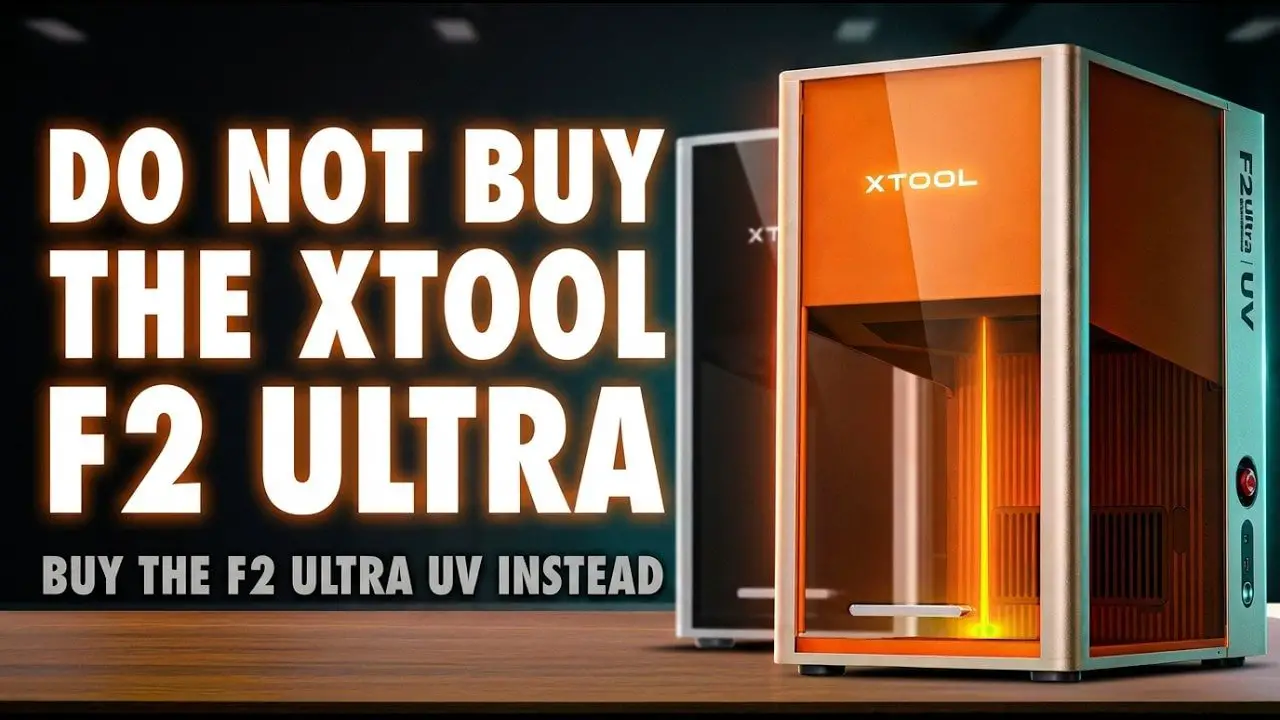
If you’ve been looking at the xTool F2 Ultra UV and trying to work out whether it is genuinely useful or just the latest shiny machine with a long feature list, this review is here to clear that up.
On paper, the xTool F2 Ultra UV looks like one of the most versatile lasers in xTool’s lineup. It promises fine detail, cleaner marking, inner crystal engraving, glass work, plastic marking, coated metal marking, and a more guided workflow than the usual laser experience. That is a lot to promise from one machine, especially at this price point.
But versatility always comes with trade-offs.
The real question is not whether the xTool F2 Ultra UV can do impressive things. It clearly can. The real question is whether those impressive things match the kind of work you actually want to do. If your projects are mostly cutting, deep engraving, or fast batch work, the answer may be different than if you care about precision, finish, specialty materials, and products that other laser types simply cannot handle.
This is a premium machine with some genuinely excellent ideas behind it. It is also a machine that can be misunderstood very easily if you buy it for the wrong reason. So rather than just listing specs and repeating marketing terms like “cold laser,” let’s look at what the xTool F2 Ultra UV is actually like to own and use, where it shines, where it slows down, and who should buy it.
Table des matières
- xTool F2 Ultra UV – Summary
- First Impressions and Build Quality
- Design, Ports and Controls
- Setup, Calibration and Camera Accuracy
- Software and Workflow
- Included Accessories and Useful Add-ons
- What a UV Laser Actually Does
- Real-World Performance
- Best Use Cases for the xTool F2 Ultra UV
- F2 Ultra UV vs F2 Ultra vs F1 Ultra
- Pros and Cons
- Dernières pensées
- FAQ
Notez s'il vous plaît: This site uses affiliate links. Our Affiliate Partners are shown below
(Affiliate links will result in compensation to the site on qualifying purchases)
Cliquez sur ce lien et achetez vos articles de loisir sur Element Games pour le Royaume-Uni et l'Europe pour soutenir FauxHammer.com - Utilisez le code "FAUX2768" au moment du paiement pour obtenir des points de fidélité doublés.


Nos affiliés / magasins de loisirs
- ROYAUME-UNI: Element Games, L'avant-poste, Jeux Wayland, Mighty Lancer, Goblin Gaming, Planète interdite, Fournitures de décor de modèle, eBay, Amazon
- États-Unis / Canada: MTechCave, GameKastle, eBay (États-Unis), eBay (CA), Amazon
- Allemagne: Taschengelddieb
- L'Europe : eBay (DE), eBay (EN), eBay (ES), eBay (IT), Amazon
- Australie: eBay, Amazon
- Global: RedGrass Games, Couleurs de guerre
- Imprimantes 3D: Phrozen 3D, Élégoo, Anycubique
FauxHammer - Dernière vidéo sur YouTube
xTool F2 Ultra UV – Summary
The short version is this: the xTool F2 Ultra UV is not the right laser for everyone, but it is one of the most compelling options available for people who care about precision marking and material versatility more than raw speed.
This machine is at its best when you use it for the kinds of applications UV lasers are famous for:
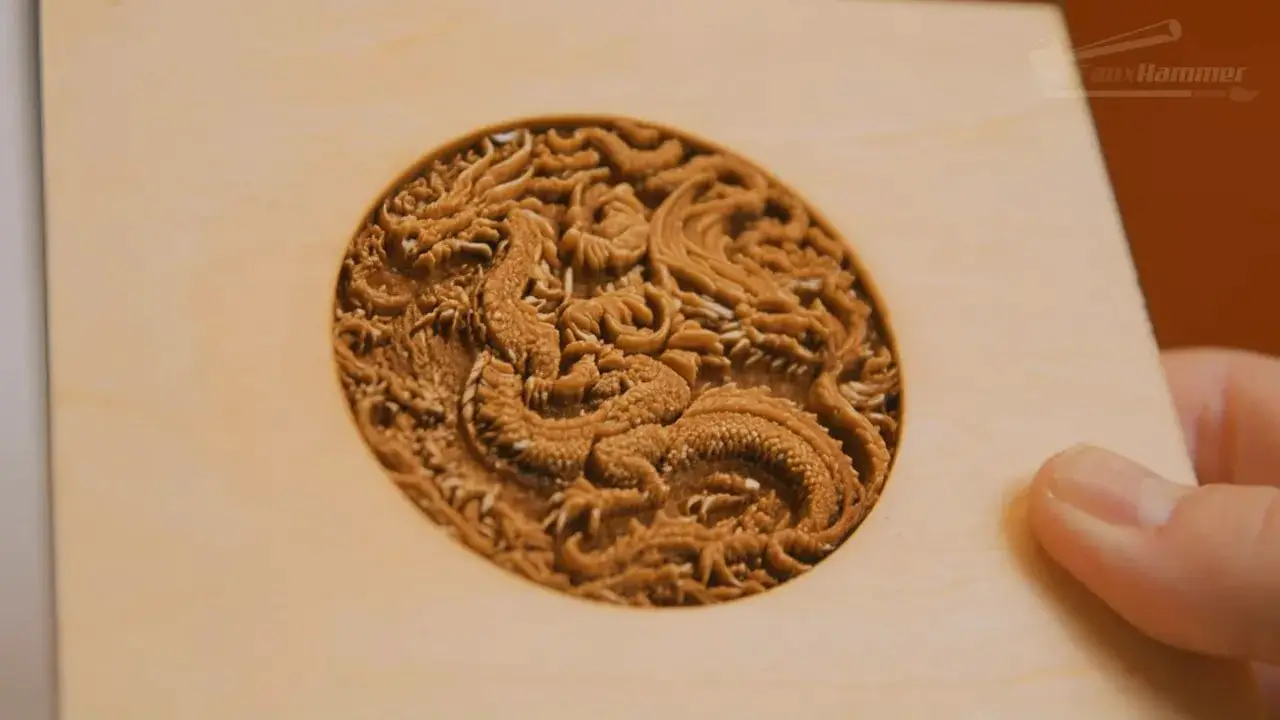
Inner crystal engraving
Glass and transparent material marking
Clean marking on plastics
Fine detail engraving
Coated metals and delicate surface work
Very small text and intricate line work
Where it is weaker is equally important:
It is slower than diode and IR alternatives
It is not the laser to buy for deep engraving
It is not the laser to buy primarily for cutting
Its camera system is useful, but not perfect
Some premium touches are still missing, such as Ethernet and more advanced screen functions
If your goal is broad creative flexibility and high-finish marking, the xTool F2 Ultra UV makes a lot of sense. If your goal is production speed, deep material removal, or heavier cutting, the standard F2 Ultra or even the F1 Ultra may be the smarter choice.
First Impressions and Build Quality
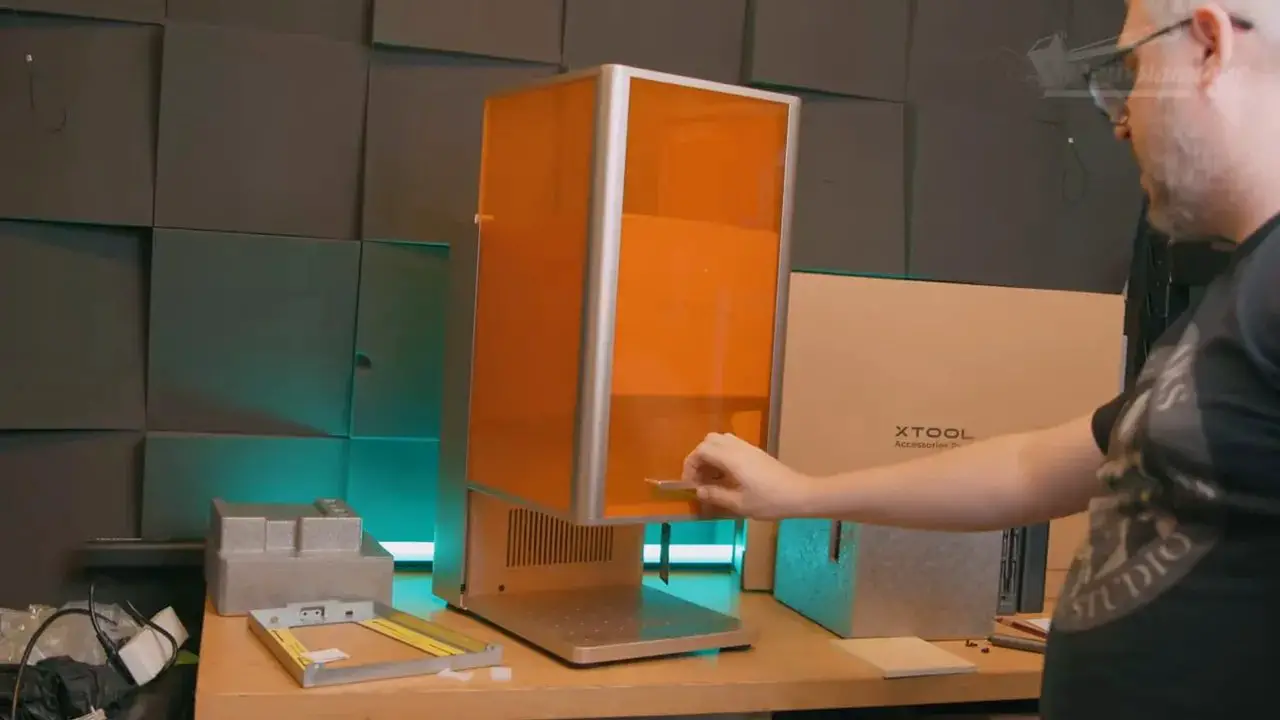
There is no getting around it: this feels like a premium product from the moment you open the box.
That might sound like a minor detail, but with tools like this, first impressions often tell you how much care has gone into the whole ownership experience. In this case, the packaging is clearly considered. The foam is denser and better finished than the cheap, squeaky polystyrene blocks many machines still arrive in. Components are secured properly. There is even a steel bracket inside the packaging to keep the body stable and protect the internals during shipping.
That all matters because the xTool F2 Ultra UV is not just another hobby machine in a generic shell. It is very obviously intended to sit in a more serious category.
In terms of overall build, the machine presents itself well. It feels engineered rather than simply assembled. The enclosure is solid, the access points are sensible, and compared with a lot of the laser market, the whole thing feels more thought through. It is the sort of machine that gives confidence before you even run the first job.
That said, premium does not automatically mean perfect.
One of the few surprisingly subjective complaints here is the finish. The orange safety windows make practical sense because they help block UV light, but the rest of the chassis has a tinted aluminium finish that leans toward a bronze or rose gold tone. That is entirely a matter of taste, but it will not be for everyone. A more neutral aluminium finish might have made the orange accents stand out better and matched existing xTool accessories more cleanly.
It is a small thing, yes. But at this price level, small things are fair game.
Design, Ports and Controls
One of the strongest practical improvements on the xTool F2 Ultra UV is how approachable the machine feels physically. The ports and controls are generally easy to access, and there are some welcome serviceability upgrades too.
At the rear, you get connections for power, accessories, the security USB, an external screen, and the hose inlet for xTool’s fire safety setup. There is also a large outlet for smoke and debris. One particularly good design change over the smaller F1 line is that this rear exhaust area is easier to remove and clean. The internal grill can be taken out more easily, and if the fan module ever needs replacing, it is now a simple component swap rather than a headache.
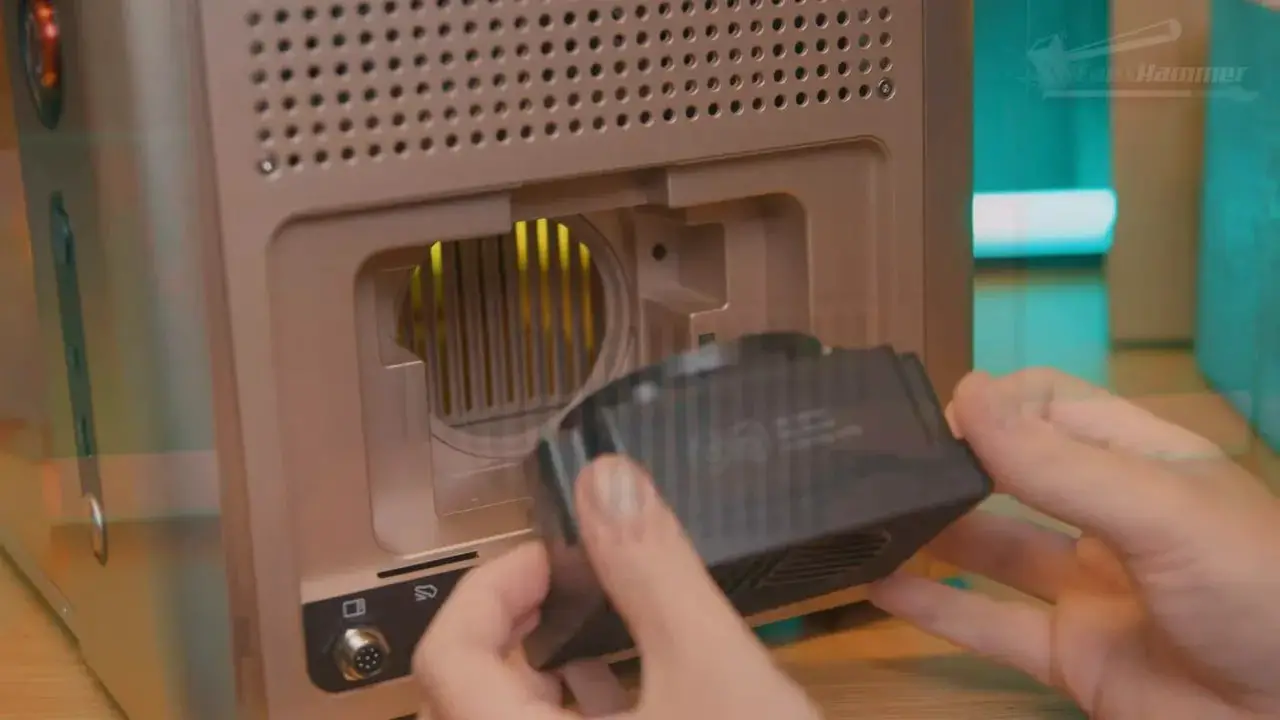
On the side, there is a USB-C connection for your computer and a USB-A port for thumb drives. The machine also supports built-in Wi-Fi. What feels slightly missing on a machine positioned this high is Ethernet. For a more professional workflow, especially in workshops where stable wired networking matters, that would have been a very sensible inclusion.
Control hardware is mainly on the right-hand side. There is a main power button, a reset button for safety checks, and an emergency stop. The reset button has to be pressed and verified before powering the machine up fully. That is sensible from a safety standpoint.
The emergency stop is where one minor criticism appears. On the F2 chassis, it sits slightly recessed compared with the easier-to-hit stop button on the F1. It looks cleaner integrated into the frame, but in a genuine emergency, aesthetics should come second to immediate access. It is not bad, but it is not the best implementation xTool has done.
There are also internal accessory ports hidden behind a rubber flap inside the enclosure for things like the rotary tool. That means you can connect an accessory and still close the lid, which is excellent. The only concern is whether dust and debris may build up around those internal ports over time.
Setup, Calibration and Camera Accuracy
Setup appears to be designed for a broader audience than the traditional laser market, and that is one of the biggest strengths of the xTool ecosystem.
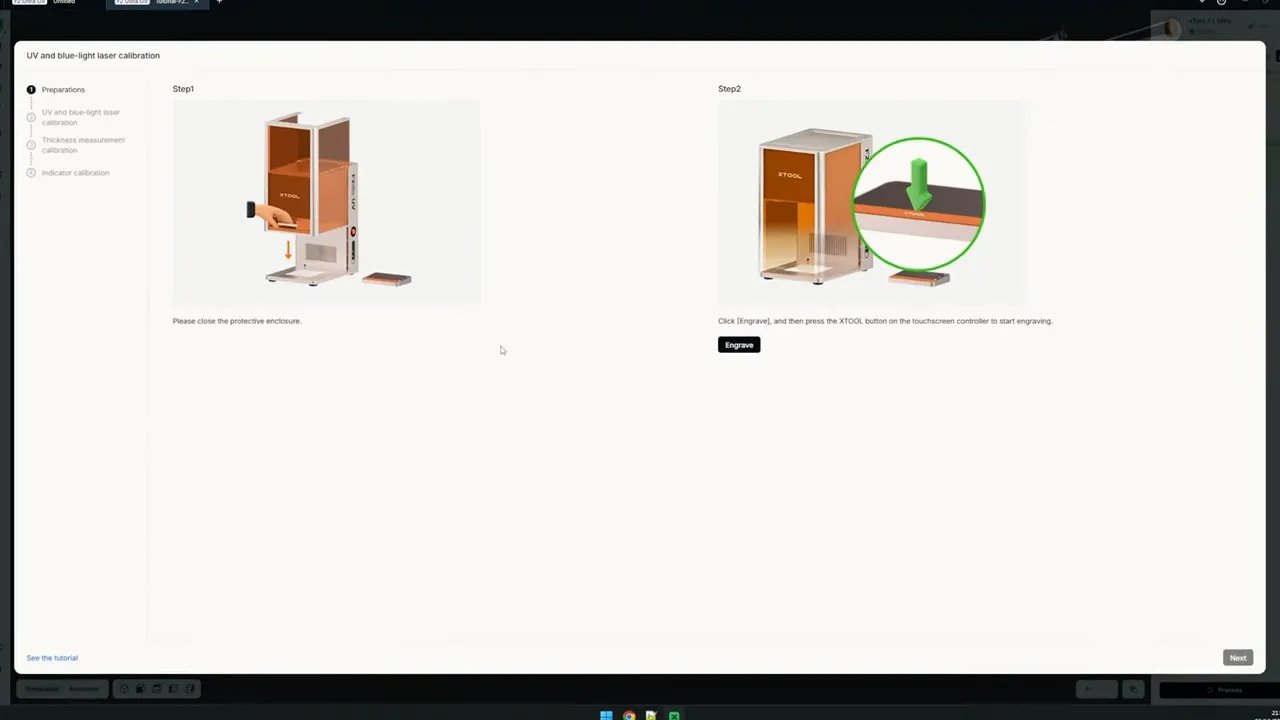
There is the usual physical setup, but one of the more important stages is camera calibration. This process is fairly straightforward. You tape down the supplied calibration card, the machine engraves alignment marks, and then the software asks you to identify those marks so it can align what the camera sees with the real work area.
That all sounds wonderfully precise, but this is the point where expectations need to stay grounded.
The camera on the xTool F2 Ultra UV is useful. It is not magic.
As with almost every laser camera system, the alignment gets you close rather than absolutely perfect. The moment you place objects of different heights inside the machine, you introduce optical distortion. That means the camera should be treated as a smart assistant, not as a guaranteed micron-accurate placement tool. Manual framing still matters, especially if your design must land exactly where intended.
That is not really a flaw unique to the xTool F2 Ultra UV. It is just the practical reality of camera-based alignment systems on machines like this.
One genuinely handy feature is material detection through xTool’s own coded materials. The camera can scan QR codes on supported stock and automatically apply a material profile in the software. That is exactly the kind of workflow simplification that makes a machine feel accessible instead of finicky.
Software and Workflow
This is where xTool currently separates itself from a huge amount of the laser market.
For years, consumer lasers have leaned heavily on software like LightBurn and LaserGRBL. Those tools can be powerful, particularly in experienced hands, but they often come with a steep learning curve and an expectation that the user will troubleshoot their way to a good result.
xTool has taken a very different approach.
Rather than throwing dozens of settings at you and hoping you know what to do, the software focuses on the outcome. You pick a design, choose what material or object you want to work with, and the software guides you through the process. If it is your first time trying a new workflow, such as rotary engraving or another processing method, the software can walk you through it in a more structured, tutorial-like way.
That is a very big deal.
The shift from “here are all the controls” to “here is how to achieve the result you want” is exactly the kind of user experience that more laser brands should have been chasing years ago.
There is also a notable pace of development here. xTool has already moved forward from its earlier software to xTool Studio, continuing to improve the ecosystem while many competing brands are still relying on the same old software expectations. Add in official guides, materials support, AI tools, and a large user community, and you get something bigger than just a laser machine. You get a platform.
That has practical value. It means:
Less time wasting material trying to guess settings
Less time hunting through forums for half-answers
Less friction for beginners
More structure for learning new workflows
More community support and user-made accessories such as jigs
That does not mean the software is beyond criticism. The external touchscreen feels somewhat underused. It can start jobs, frame jobs, display remaining time, and control Z-height movement for focus by aligning the red and blue dots. But on a premium machine with an external screen, it would be nice to see more advanced functions built directly into that interface. Autofocus, in particular, feels like an obvious omission.
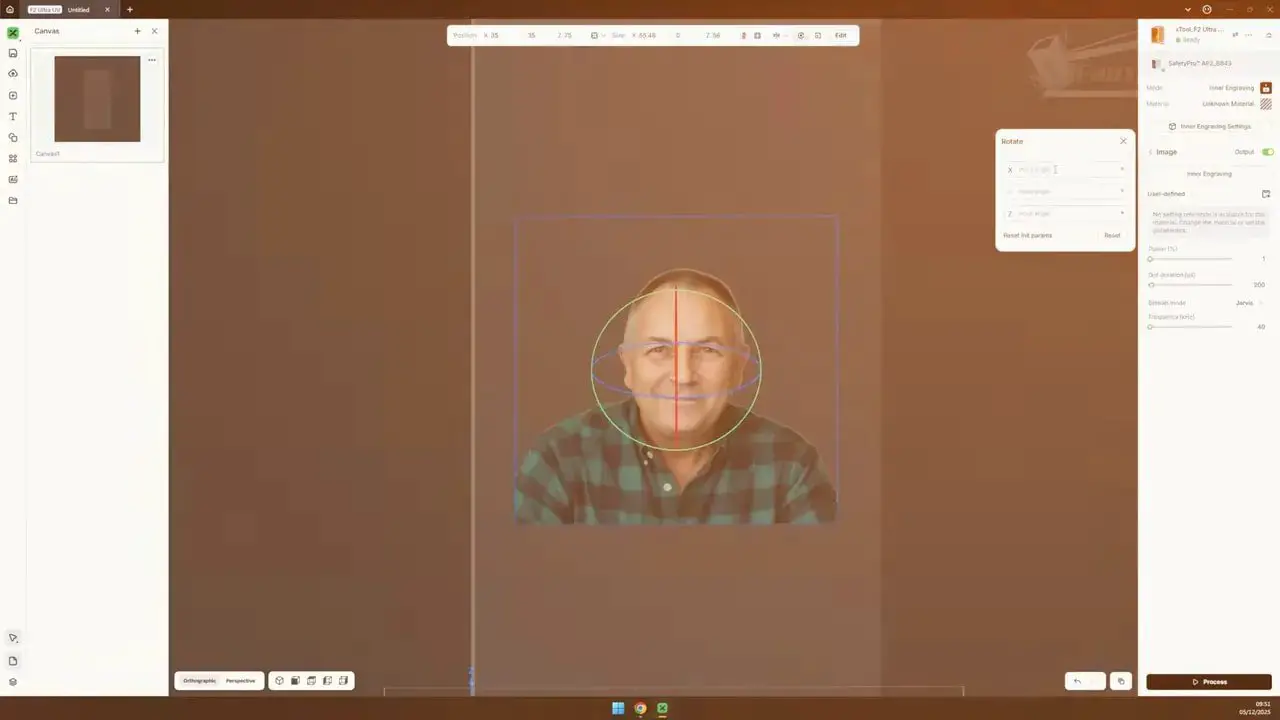
Still, if you are choosing between the xTool F2 Ultra UV and many competing lasers, software alone may be enough to sway the decision.
Included Accessories and Useful Add-ons
The included accessories with the xTool F2 Ultra UV are not just filler. At least a couple of them directly support the machine’s most interesting use cases.
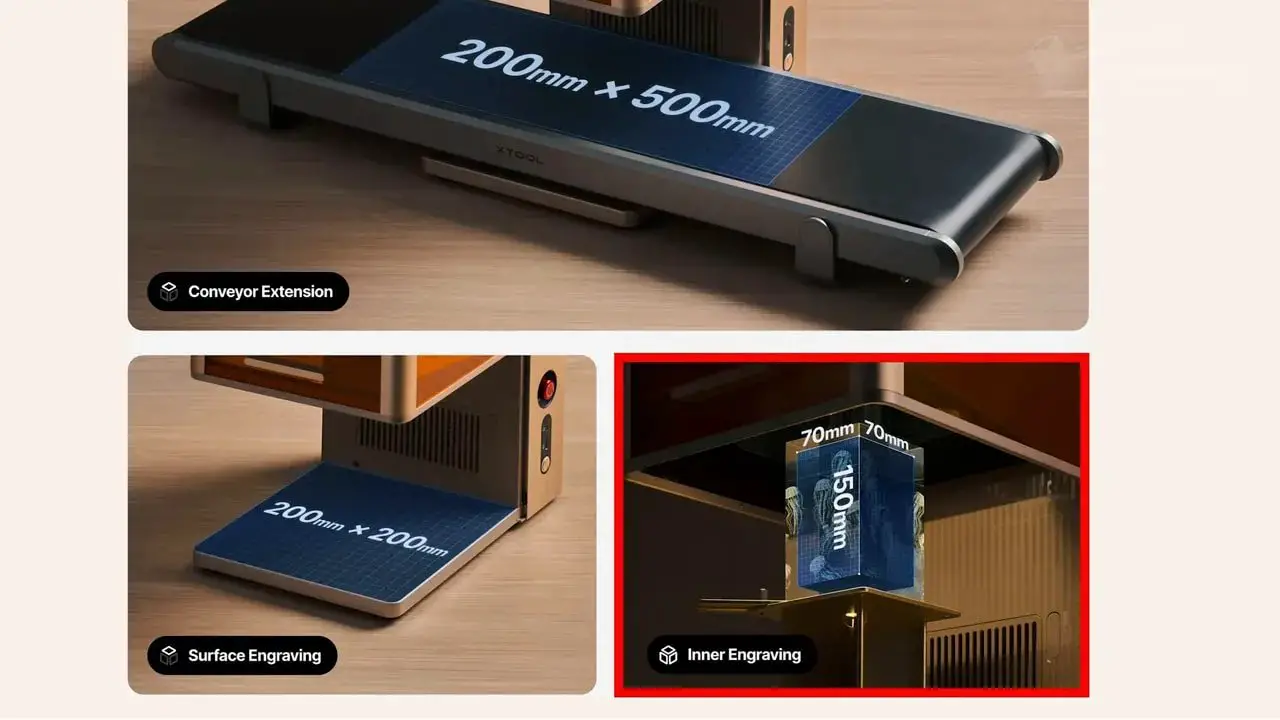
The standout is the inner crystal engraving accessory pack. This includes a dedicated lens and a riser system specifically for engraving inside crystal. The physical inner engraving limit is 70 x 70 x 150 mm, and the setup has been designed in a way that is refreshingly practical. You align the crystal within the grid, enter the starting coordinates or reference the side ruler, input the crystal dimensions, and the machine handles the job with surprising consistency.
That riser design is one of those features that sounds ordinary until you compare it with clunkier alternatives. In use, it appears to make a fiddly task much more repeatable.
The machine also includes a cutting plate intended to reduce heat buildup underneath material while cutting. Even though the xTool F2 Ultra UV is not primarily a cutting machine, it is still useful to have that support in the box.
The working area is worth mentioning too. You get a 200 x 200 mm engraving area, which is larger than other UV lasers the reviewer had tested. For some users, that extra area alone will broaden the type of work the machine can tackle.
There is also support for the xTool conveyor system, but with one gotcha: if you already own an older xTool conveyor, the F2 variant needs a different clamp bracket at the front. Without it, the conveyor can sit at the wrong angle and throw off focus across longer jobs. That can result in designs fading across the work as the material rises out of the ideal focal plane.
It is fixable, but it is definitely something worth knowing before planning conveyor-based work.
What a UV Laser Actually Does
A lot of UV laser marketing uses terms like “cold laser,” which sounds impressive but is not especially helpful.
La xTool F2 Ultra UV is not cold. The interaction point where the beam meets the material still reaches extreme temperatures. It has to, otherwise it would not alter the material at all.
What makes a UV laser different is how it delivers energy.
UV lasers use higher-energy photons and a smaller focal point, concentrating that energy into a very tiny surface layer rather than heating a broader surrounding area the way diode or IR machines often do. The practical result is less heat spread into nearby material and cleaner, more controlled marking on surfaces that might scorch, melt, or react badly under other laser types.
This is the core trade-off behind the xTool F2 Ultra UV:
Smaller focal point means finer detail
Finer detail means more lines are needed to cover the same area
More lines means slower jobs
That is why UV machines can produce incredibly crisp, intricate results, including text as small as around 1 point appearing clearly, while also being noticeably slower than diode or IR lasers for broader work.
So if you have been thinking of UV as a straight upgrade, it is better to think of it as a specialization. It is not “better at everything.” It is better at a different class of tasks.
Real-World Performance
This is where the buying decision becomes much clearer.
La xTool F2 Ultra UV can produce extremely sharp results, but speed is the price you pay for that precision.
There are a few real-world examples that help put this in perspective:
Cutting the perimeter of a 200 mm square from 3 mm plywood took about 2.5 minutes
A depth engraving in wood took roughly 3 hours for just 30 passes
A 40 mm brass coin engraving took 256 passes and almost 3 hours, while still not achieving major depth
Marking a 200 x 200 mm printed PLA sheet with a Christmas design took around 45 minutes, even at 3400 mm/s
That tells you almost everything you need to know.
If your work involves large filled areas, substantial engraving depth, or lots of throughput, this is not going to feel fast. In fact, compared with more powerful diode or IR alternatives, it may feel positively leisurely.
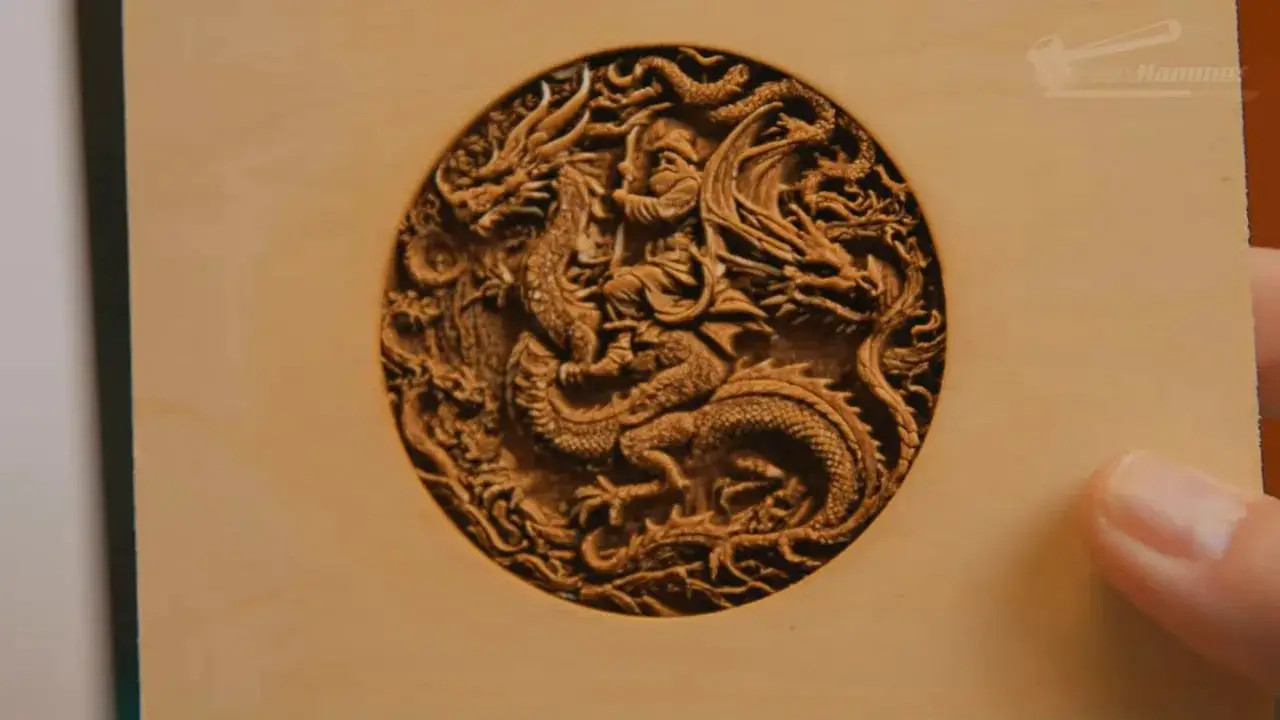
But speed is only half the story. The quality of the result matters too. The brass coin engraving, for example, was not especially deep, but the design came out very sharp. Plastic marking was described as incredible. Fine line work and ultra-small detail are clearly in this machine’s comfort zone.
So the question is not whether the xTool F2 Ultra UV is slow. It often is. The question is whether it is slow for the kind of output you value. If the finish is the product, that time can be justified. If the depth or throughput is the product, it may not be.
Best Use Cases for the xTool F2 Ultra UV
The strongest case for the xTool F2 Ultra UV is not in generic engraving. It is in jobs that either look better under UV, need UV to work at all, or become commercially interesting because of that difference.
The most obvious example is inner crystal engraving.
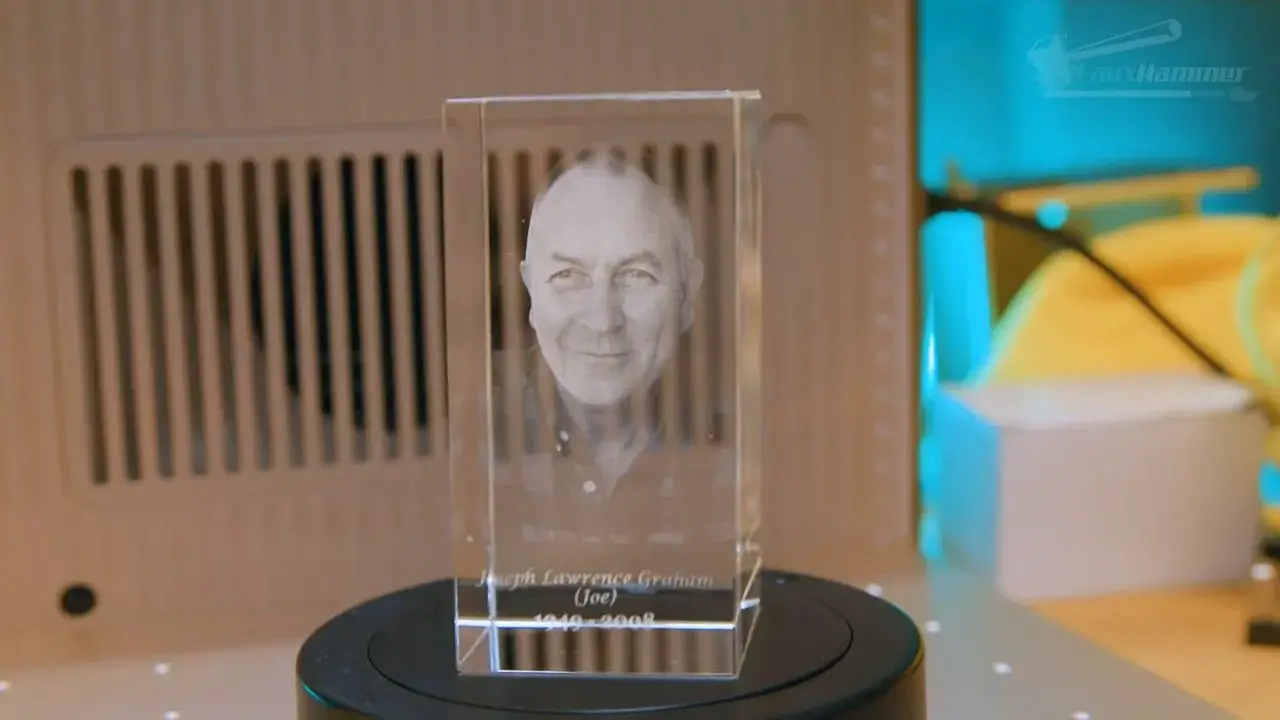
This is one of the most compelling things the machine can do, and it is also where the emotional and commercial value intersect. One project involved creating a crystal engraving of the reviewer’s late father using an STL that other laser software had struggled with. On this machine, the file loaded and ran successfully, producing the intended result on the first attempt.
That alone says a lot about both the machine and the software stack around it.
There is also a practical business angle. A single photo of the finished crystal was enough to generate immediate interest from multiple people wanting similar family keepsakes made. That should tell any small business owner something important: this is not just a novelty feature. It is potentially a high-value, emotionally resonant product category.
Beyond crystal, the xTool F2 Ultra UV is especially appealing for:
Custom glassware
Plastic item personalization
Coated metal marking
High-detail logo work
Fine labels and precision text
Projects where scorching or heat spread needs to be minimized
It is also a machine that encourages experimentation because the software lowers the barrier to trying different methods. That matters more than it might sound. A lot of “versatile” hardware never feels versatile in practice because the workflow makes unusual jobs too painful to attempt. Here, that barrier appears much lower.
F2 Ultra UV vs F2 Ultra vs F1 Ultra
If you are choosing between xTool machines, this is where things become very practical.
The standard F2 Ultra, the xTool F2 Ultra UV, and the F1 Ultra are not interchangeable. They overlap, but they are not best for the same tasks.
xTool F2 Ultra UV
Best for precision marking
Best for plastics, glass, coated metals, crystal and ultra-fine detail
Slower than the alternatives
Not ideal for deep engraving or speed-focused cutting
Standard xTool F2 Ultra
Better choice if you want more cutting and stronger material removal
More suitable for users focused on depth engraving
Less versatile on specialty materials than the UV version
xTool F1 Ultra
A stronger option if your focus is depth or faster marking on certain materials
Likely a better fit if you care less about UV-specific applications and more about throughput
The easiest way to think about it is this:
Si tu veux versatility across unusual surfaces and exceptionally fine marking, get the xTool F2 Ultra UV.
Si tu veux more practical speed, deeper engraving, and broader cutting usefulness, the standard F2 Ultra probably makes more sense.
If you already know you do not need UV-specific material handling, then paying the UV premium may not be the smartest move.
Pros and Cons
Pour
Excellent build quality and premium presentation
Outstanding software and guided workflow
Very fine detail capability
Marks materials that diode and IR lasers cannot handle well
Inner crystal engraving is a genuinely standout feature
Large 200 x 200 mm working area for a UV machine
Useful ecosystem support, accessories and community resources
Cleaner marking on plastics and sensitive surfaces
Contre
Slow compared with diode and IR alternatives
Not the right tool for deep engraving
Limited value as a cutting-first machine
Camera alignment is helpful but not perfectly accurate
No Ethernet on a professional machine that otherwise feels quite professional
The external touchscreen could do more
Emergency stop is slightly less immediate than on the F1 design
The finish and colour scheme may not be to everyone’s taste
Dernières pensées
La xTool F2 Ultra UV sits in a slightly unusual place in the laser market because it is not just selling hardware. It is selling a way of working.
That may sound like marketing fluff, but in practice it matters. A lot of laser machines are built around the assumption that the user will do the hard part themselves: figure out settings, troubleshoot weird problems, find community-made fixes, and slowly build enough experience to get repeatable results. xTool’s approach is much more structured. The machine, software, materials support, guided workflows, and wider ecosystem all work together to reduce that friction.
That does not make the xTool F2 Ultra UV cheap, and it does not make it perfect. But it does make it feel like a more complete product than a lot of alternatives.
The key thing to understand is that this is not the laser to buy for brute force. It is not the machine for speed-first production, aggressive depth, or heavy cutting work. If those are your priorities, there are better options in xTool’s own lineup.
But if your priorities are detail, surface quality, cleaner material interaction, and access to applications like inner crystal engraving that other laser types simply cannot match, then the xTool F2 Ultra UV absolutely earns its place.
It is slower, yes. But it is slower because it is working at a different scale, with a different purpose, and on different materials.
That distinction matters.
For the right buyer, the xTool F2 Ultra UV is not just another laser. It is the machine that unlocks an entirely different category of projects.
xTool F2 Ultra UV FAQ
Is the xTool F2 Ultra UV good for beginners?
Yes, especially compared with many traditional laser setups. The software is one of the strongest reasons to buy into xTool because it guides the user through tasks rather than expecting deep prior knowledge. That said, this is still an expensive and capable machine, so beginners should still take safety and material knowledge seriously.
Is the xTool F2 Ultra UV faster than the standard F2 Ultra?
No. The xTool F2 Ultra UV is generally slower because the UV beam uses a smaller focal point and needs more lines to cover the same area. That trade-off is what gives it its fine detail and material versatility.
Can the xTool F2 Ultra UV do deep engraving?
It can do depth engraving on some materials like wood and soft metals, but it is not efficient for that kind of work. Jobs can take a very long time, and if depth is your main priority, the standard F2 Ultra or another more suitable laser type would be a better buy.
What materials is the xTool F2 Ultra UV best suited for?
It is especially well suited to plastics, glass, coated metals, crystal engraving, and delicate surface marking where fine detail and lower heat spread are important. That is where the xTool F2 Ultra UV stands apart from many diode and IR machines.
How accurate is the camera on the xTool F2 Ultra UV?
The camera is useful for setup and positioning, but it should not be treated as perfectly precise. Height differences in objects can cause optical distortion, so manual framing is still important for exact placement.
Is the xTool F2 Ultra UV worth it for a small business?
It can be, particularly if your business model includes premium personalized items such as inner crystal engravings, glass pieces, detailed plastic marking, or specialty material work. The machine’s slower speed matters less when the finished products command higher value.
Does the xTool F2 Ultra UV work with LightBurn?
No, this machine uses xTool’s own software ecosystem rather than LightBurn. That will bother some experienced users, but for many people the xTool workflow will actually be easier and more productive.
What is the working area of the xTool F2 Ultra UV?
The maximum engraving area is 200 x 200 mm, which is notably large for this type of UV laser. It can also be extended widthways using xTool’s conveyor setup, though existing conveyor owners may need a different front clamp bracket for the F2 version.
If you are trying to decide between the xTool F2 Ultra UV and the standard F2 Ultra, the best advice is simple: buy the one that matches the work you actually want to do, not the one with the most impressive-sounding feature list.
And in the case of the xTool F2 Ultra UV, that means buying it for precision, finish, and specialty applications rather than expecting it to behave like a speed-focused cutter.
Notez s'il vous plaît: This site uses affiliate links. Our Affiliate Partners are shown below
(Affiliate links will result in compensation to the site on qualifying purchases)
Cliquez sur ce lien et achetez vos articles de loisir sur Element Games pour le Royaume-Uni et l'Europe pour soutenir FauxHammer.com - Utilisez le code "FAUX2768" au moment du paiement pour obtenir des points de fidélité doublés.
Nos affiliés / magasins de loisirs
- ROYAUME-UNI: Element Games, L'avant-poste, Jeux Wayland, Mighty Lancer, Goblin Gaming, Planète interdite, Fournitures de décor de modèle, eBay, Amazon
- États-Unis / Canada: MTechCave, GameKastle, eBay (États-Unis), eBay (CA), Amazon
- Allemagne: Taschengelddieb
- L'Europe : eBay (DE), eBay (EN), eBay (ES), eBay (IT), Amazon
- Australie: eBay, Amazon
- Global: RedGrass Games, Couleurs de guerre
- Imprimantes 3D: Phrozen 3D, Élégoo, Anycubique



 Français
  English (UK)
  Deutsch
  Italiano
  Español